
From Chat Window to Chief of Staff: Everything You Need to Know About Claude Duet
Most AI assistants still wait for you. You open the app, type a prompt, read the answer and close the tab, and nothing happens until you come back. Claude Duet flips that around. Instead of waiting to be asked, it comes to you with what needs your attention, keeps working after you step away, and checks with you before it acts on your behalf.
Anthropic opened Claude Duet as a research preview on October 21, 2026. It runs on Claude Opus 5.5, Anthropic’s most capable model, and it is Anthropic’s answer to the new wave of always-on personal agents, including OpenAI Dots and Meta Muse. Anthropic’s own pitch is simple: “Get back to what needs you.”

Claude Duet starts the day with a morning brief, then keeps working in the background across your connected apps.
What is Claude Duet?
Claude Duet is a proactive AI agent that lives in its own app, separate from the regular Claude chat app. You message it like a teammate, by text or by voice, and it works across the apps you have connected. Anthropic describes it as a kind of “chief of staff” for professionals and small business owners who have too much to track.
- It reaches out first: The Claude app waits for you to open a chat. Duet sends you a morning brief, takes tasks by message and notifies you when work is ready or needs a decision.
- It has its own cloud computer: Duet runs on a dedicated cloud machine, so it keeps working after you close the app. For websites without a connector, it uses a cloud-hosted browser.
- It already knows you: Duet uses the same memory, skills and connected apps as your Claude account, and it can search your past conversations. There are no prompts to write and almost no setup.
The Analogy: A normal chatbot is like a very smart consultant you phone when you remember to. Claude Duet is more like a chief of staff who reads your inbox before you wake up, tells you the three things that matter today, and has already drafted the first reply for you to approve.
Key Features & Capabilities
| Feature | What It Does |
|---|---|
| Morning Brief | Each morning Duet reviews your email and calendar, picks out the most urgent items and can start the first steps, such as drafting replies for your review. Then it stays quiet until something needs you. |
| Background Check-Ins | Through the day it checks your connected apps every few hours, posts progress updates, follows up on threads that have gone quiet and alerts you when something needs attention. |
| 6,000+ Connectors | Works with more than 6,000 connectors and plugins from the Claude Marketplace, including Gmail, Google Calendar, Slack, Notion, HubSpot, QuickBooks, Stripe, Shopify and Ramp. |
| Make Tab | Larger jobs come back as editable files, such as research briefs, financial models, slide decks and dashboards, and Duet keeps them up to date. |
| Tasks Tab & Channels | Track ongoing work and see what needs your input. Keep one main thread or open separate channels per topic, all sharing the same memory. Only you can mark a task as finished. |
| Approval Guardrails | Duet asks before it sends a message, makes a payment, signs a document or deletes anything. It does not see your passwords, and a dedicated classifier checks messages so sensitive information does not leak. |

One agent, many apps: Duet works across 6,000+ connectors and runs on its own cloud computer.
How Claude Duet Helps in Daily Work and Life
💼 Small Business & Professional Work
- Getting Paid: Through the Stripe connector, Duet can find unpaid invoices and draft polite payment reminders for you to approve.
- Running the Numbers: It can build a daily business health dashboard that pulls from your point-of-sale, e-commerce, CRM, support, payroll and bank data, or prepare payroll for your review.
- Projects with Many Moving Parts: Anthropic’s own example is a 41-item checklist for opening a new store, where Duet tracks every item and comes back to ask you to approve a permit fee.
- Investor and Client Prep: Duet can pull together meeting materials, review a deck and data room, get contracts ready to send and draft the cover email for you to send yourself.
- Spotting Problems Early: It can analyse subscription churn, for example, and propose a test such as changing your free-shipping threshold.
🏠 Personal Tasks
- Planning and Purchases: Duet can help plan a trip, and through Stripe’s Link wallet or Shopify’s Shop Pay it can make online purchases, but only after you approve each one.
- Keeping You in the Loop: Because it watches your inbox and calendar, it can remind you about the personal deadline that was buried under work email.
Anthropic is honest that personal tasks are still the rougher side of the product. Duet is built first for work, and early reviewers say errands and ticket booking are not its strength yet.
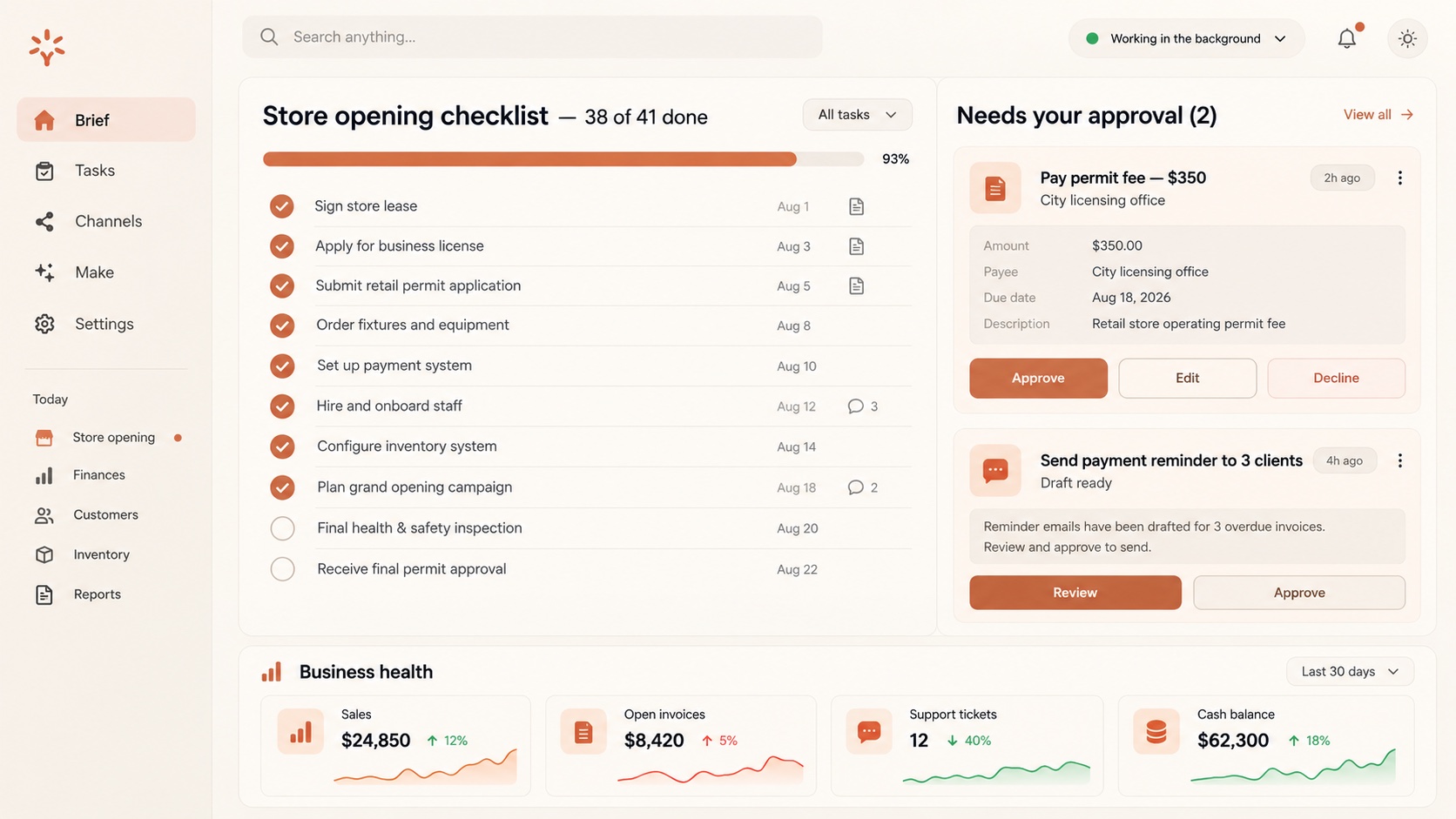
Duet tracks a store-opening checklist and pauses for your approval before paying a fee or sending reminders.
What Claude Duet Will Not Do (Yet)
Because Duet can act inside your real accounts, Anthropic has drawn some firm lines and is open about its limits during the research preview:
- No trading or money transfers: Duet will not trade securities or move money between your accounts.
- No sensitive IDs by default: It turns down requests for credit card numbers and government identification.
- It can still get things wrong: Anthropic warns that Duet may misread a thread, misjudge what is urgent, or miss something that arrives between check-ins.
- Early-version gaps: Hands-on reviews note there is no full voice conversation mode yet (only transcription), scheduled runs cannot reach custom connectors, and you cannot watch its browser work live.
How to Use Claude Duet Effectively
- Connect the Apps That Matter First: Email, calendar and the one or two tools you live in every day give Duet enough context for a useful morning brief.
- Talk to It Like a New Hire: Tell it what you care about, what counts as urgent for you and what it should never do without asking.
- Use Channels for Big Topics: Give a product launch, a hiring round or your bookkeeping its own channel so updates do not get mixed together.
- Review Every Approval Properly: The approval step is your safety net. Read the draft email or payment before you tap approve, especially in the first few weeks.
- Watch Your Usage: Background checks and large jobs like financial models use more of your plan’s limits than ordinary chat.
Access & Pricing
Claude Duet does not cost extra, but it is not open to everyone yet:
- Claude Pro & Max (US): Eligible for the research preview through a waitlist, with invitations sent out in waves.
- Usage limits: Duet shares your plan’s usage limits with the rest of Claude, and its background work counts too, so Anthropic warns you may hit your limits sooner than with chat alone.
- Team & Enterprise plans: Not included yet. Anthropic says it plans to expand access.
- Free plan & outside the US: Not available during the preview.
How to Start: Step-by-Step Sign Up Guide
- Check Your Plan: Make sure you have an active Claude Pro or Max subscription on a US account.
- Join the Waitlist: Go to claude.com/product/claude-duet and click “Join the waitlist”.
- Get the App: Once invited, install the Claude Duet app on iOS or Android, or use it on the web at claude.ai.
- Connect Your Apps: Link email, calendar and your key work tools. Your existing Claude memory and skills carry over automatically.
- Start Small: Let it run your morning brief for a week, then hand it one real task, such as chasing unpaid invoices, and see how it handles the approval step.
Claude Duet vs. OpenAI Dots
Both are always-on agents with their own cloud computers and approval guardrails. OpenAI Dots leans towards technical and enterprise teams, while Claude Duet is aimed squarely at busy professionals and small business owners, with a morning brief, business dashboards and payment connectors at its core. Early hands-on reviews find Dots writes better email drafts, while Duet feels more like a “pro tool” for running a business. Want the bigger picture? Read our guide to Gemini Agent for Work as well.
Conclusion
Claude Duet is Anthropic’s clearest step from chatbot to colleague. It reads what is coming in, tells you what matters, does the groundwork in the background and waits for your yes before anything leaves your hands. It is still a research preview, it shares your usage limits and it will sometimes misjudge what is urgent, but for a small business owner drowning in email, invoices and checklists, it is one of the most practical AI agents released so far.
What would you hand to an AI chief of staff first: your inbox, your invoices or your to-do list? Share your thoughts in the comments below!




Reviews
There are no reviews yet.